
Launching a product in one market is already a coordinated effort. Product pages, promotional graphics, instruction manuals and campaign materials must all be ready at roughly the same time.
Add three or four languages, and the workload can multiply quickly. A single product image may return from translation with text that no longer fits the design. A marketing team may update a promotional claim after the manual has already been translated. Files move between translators, designers and regional reviewers, leaving everyone unsure which version is ready to publish.
A multilingual product launch workflow gives these tasks a repeatable structure. With clearer source files, connected translation and visual editing, and defined review stages, teams can expand their content without recreating the entire launch process for every market.
Why Multilingual Launches Create So Much Repeated Work
The translation itself is only one part of ecommerce localization. Most launches include several types of visual content:
- Product images with embedded feature descriptions
- Marketing posters and campaign graphics
- Marketplace banners
- PDF manuals and product guides
- Regional promotional materials
- Supporting documents for customers and distributors
These files often pass through separate workflows. Text may be copied from an image into a spreadsheet, sent to a translator and returned to a designer. PDF manuals may be handled by another team. Regional reviewers may send corrections through email or chat.
The process becomes difficult to track because each asset creates its own chain of tasks. When the source content changes, teams may have to repeat the same work across every language and file type.
A well-designed multilingual product launch workflow connects these activities and gives everyone a shared process to follow.
Step 1: Prepare the Source Content
Localization problems often begin before translation starts. Duplicate files, inconsistent product names and unfinished source copy create confusion later.
Teams should begin by collecting the final source assets for each product. This may include the main listing images, promotional graphics, manual and market-specific campaign materials.
The source review should confirm:
- Which file is the current version
- Whether product names are consistent
- Whether measurements and specifications are correct
- Which text appears across multiple assets
- Whether any content still requires legal or technical approval
- Which elements must remain unchanged in every market
A simple asset list can prevent an outdated image or draft manual from entering the translation workflow. It also gives project owners a clear view of the materials required for launch.
Step 2: Group Assets by Product or Campaign
Processing files individually may appear manageable at first, but it makes consistency harder to maintain as volume grows.
A better approach is to group related assets into launch packages. One package might contain all images, posters and documentation associated with a specific product. Another might cover every asset required for a seasonal campaign.
This structure allows reviewers to evaluate the complete customer experience. They can check whether a feature name appears consistently in the listing image, promotional banner and instruction manual.
Batching also makes progress easier to measure. Instead of tracking dozens of unrelated files, teams can track the status of each product or campaign across its target languages.
Step 3: Connect Translation With Visual Editing
Visual materials require more than translated text. The words must fit naturally into the available space and remain readable within the design.
Longer translations may affect line breaks, font size and alignment. Text placed over a product photo may cover an important detail. A translated heading may need to be repositioned to preserve the original visual hierarchy.
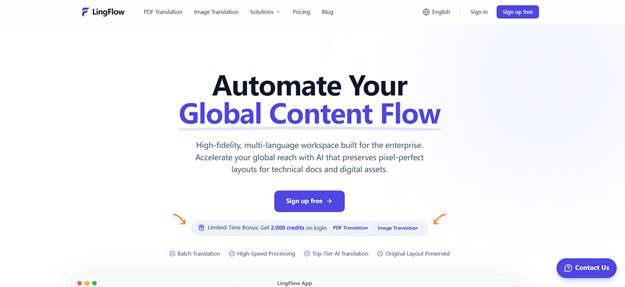
LingFlow is designed for this part of the process. The platform provides a workflow in which ecommerce and international operations teams can upload product images, marketing posters and PDF manuals, generate translated content, and then review or edit the visual assets online.
Using an ecommerce localization tool t[2] hat brings translation and image editing together can reduce the repeated handoffs between translators and designers. Reviewers can assess the language in its intended visual context, where layout problems are easier to identify.
Step 4: Handle Manuals as Part of the Launch
Product documentation is sometimes treated as a separate project, even though customers may need it as soon as the product becomes available.
Manuals can be particularly demanding because they combine headings, body text, diagrams, tables and page-level formatting. Copying the content into a separate document for translation creates additional reconstruction work and increases the chance of missing a label or instruction.
LingFlow supports PDF manuals alongside visual marketing assets. An AI document translation workflow can help teams prepare an initial multilingual version while keeping the document connected to the wider product launch.
Technical or safety-related information should receive dedicated human review. A language reviewer can check clarity, while a product specialist confirms that specifications, warnings and operating instructions remain accurate.
Step 5: Define the Review Sequence
A file marked “translated” may still require several checks before publication. Clear review stages prevent teams from assuming that someone else has approved the final asset.
A practical sequence may include:
- Translation review: Check meaning, grammar and market-appropriate language.
- Terminology review: Confirm product names, feature labels and recurring phrases.
- Visual review: Inspect spacing, line breaks, alignment and readability.
- Product review: Verify measurements, specifications and instructions.
- Market approval: Ask a regional owner to confirm that the material is suitable for local customers.
- Final release check: Confirm the correct language and version before publication.
Each stage should have a named owner. When responsibilities are vague, corrections tend to circulate between teams without a final decision.
Step 6: Keep Approved Language Reusable
Product launches often share recurring content. Shipping statements, product features, care instructions and brand terminology may appear across multiple assets.
Teams should keep a record of approved terms and phrases for each language. This reference can help translators and reviewers maintain brand consistency and reduce repeated discussions.
The same principle applies to corrections. If a regional reviewer changes a product term in one image, the team should check whether that term also appears in the manual, campaign poster or another product listing.
A reusable language reference becomes more valuable with every launch because it preserves decisions that would otherwise remain scattered across emails and individual files.
Step 7: Run a Small Pilot Before Scaling
Before processing an entire catalogue, teams can test the multilingual product launch workflow with one product and one target market.
The pilot should include several asset types so the team can evaluate the complete process. A useful test package might contain five product images, one promotional graphic and one PDF guide.
During the pilot, record:
- How long each stage takes
- Where manual intervention is required
- Which layout problems appear most often
- How many review rounds are needed
- Whether terminology remains consistent
- Where reviewers become unsure about ownership
These observations can be used to improve the workflow before the next batch begins.
Step 8: Measure Work That Happens After Translation
Translation speed is useful, but it does not show the full cost of localization. Teams should also examine the work required to bring an asset from the first translated version to final approval.
Helpful measurements include:
- Average turnaround time per product
- Number of manual layout corrections
- Percentage of assets approved in the first review
- Time spent transferring content between tools
- Number of terminology inconsistencies
- Errors identified after publication
- Cost per localized product or campaign
These metrics reveal whether the workflow is reducing repetitive work and improving launch readiness.
Build a Process That Improves With Each Market
International expansion creates more content, more reviewers and more opportunities for inconsistency. A repeatable multilingual product launch workflow keeps that complexity manageable.
Preparing clean source assets, grouping related materials, connecting translation with visual editing and defining approval stages can reduce unnecessary handoffs. Human reviewers remain central to language quality, product accuracy and local relevance.
LingFlow supports this workflow by bringing product images, promotional materials and PDF manuals into one AI-assisted localization environment. As teams reuse approved terminology and refine their review process, each new market launch can become more predictable and easier to coordinate.
 Shaban Ch