

A product guide is approved in English. Two days later, a distributor requests a Spanish version, a new employee needs it in French, and a customer asks whether the same information is available in Japanese.
For a small team, this is where a straightforward translation task can become difficult. Files are emailed between colleagues, translated text is pasted into new documents, tables move out of place, and nobody is quite sure which version contains the latest update.
A reliable multilingual document workflow keeps this process manageable. It gives each file a clear starting point, reduces unnecessary reformatting and makes translated documents easier to review and update.
Start With One Approved Source Document
Every translation project should begin with a single approved source file. If several employees work from slightly different versions, those differences will appear in every translated copy.
Before translation begins, confirm that the source document contains:
- The latest approved text
- Correct product names and technical terms
- Final images and captions
- Working tables and lists
- Consistent headers and footers
- Accurate contact information
- A clear revision date or version number
Give the file a descriptive name, such as Installation_Guide_EN_v3.docx. Avoid names such as final-new-revised.docx, which quickly become confusing when several people are editing the same material.
Prepare the DOCX File for Translation
A tidy source document usually produces a cleaner translated file. Review the Word document before uploading or sending it to a translator.
Use Word styles for headings instead of manually changing the size and weight of each title. Keep related text in the same paragraph and remove unnecessary line breaks. Check whether important information appears inside text boxes, images or complex diagrams, since these elements may require separate attention.
Tables deserve particular care. Translation often changes the length of the text, so narrow columns may become crowded. German or French content, for example, may require more horizontal space than the English source. Leaving a little flexibility in the original layout can save time later.
The same principle applies to forms and numbered instructions. Clear structures make it easier for reviewers to compare the translation with the source.
Choose a Workflow That Keeps the Document Editable
Small teams often lose time copying translated text back into a Word file and rebuilding its layout. A document-focused translation service can reduce this manual work by returning the content in an editable format.
For example, Doc Translator [2] is designed for DOCX files. Users can upload one Word document, allow the source language to be detected or select it manually, and choose from more than 100 target languages. The translated file is returned as an editable DOCX.
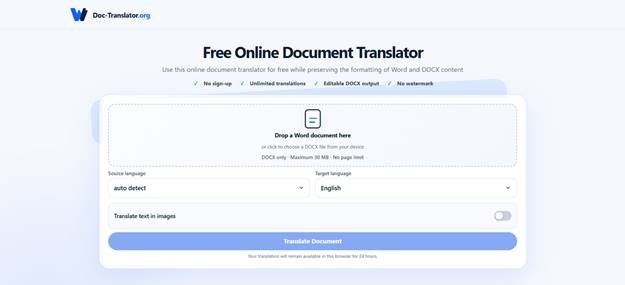
The service aims to retain elements such as paragraphs, tables, images, fonts, basic character styles, page dimensions, margins, lists, headers and footers. It accepts individual files of up to 30 MB and does not require registration.
Preserving the document structure can shorten the production process, although every translated file should still be reviewed. Longer text may alter line breaks, table dimensions and pagination even when the underlying formatting remains in place.
Separate Translation From Review
A finished translation still needs quality control. Assigning the review to a second person is ideal, especially for customer-facing or technical documents.
A practical review can be divided into three passes.
Language Review
Check whether the translation communicates the original meaning clearly. Pay particular attention to product terminology, industry phrases, instructions and warnings.
Automatic translation can handle many common sentences, but context remains important. A word that works in a marketing brochure may be inappropriate in a safety manual or legal notice.
Content Review
Confirm that names, dates, measurements, prices, URLs and model numbers match the source file. These details can be missed when reviewers focus mainly on grammar.
Also check whether every paragraph has been translated. Text inside tables, headers, footers and captions is easier to overlook than body copy.
Layout Review
Open the translated DOCX and inspect it page by page. Look for:
- Headings that wrap awkwardly
- Text cut off inside tables
- Lists with inconsistent indentation
- Images separated from their captions
- Unexpected blank pages
- Headers or footers that no longer fit
- Page references that need updating
This final visual check is essential before the file is exported to PDF, printed or sent to a customer.
Create a Simple Naming System
Multilingual files need names that identify the language and version immediately. A consistent pattern might look like this:
- Employee_Handbook_EN_v2.docx
- Employee_Handbook_ES_v2.docx
- Employee_Handbook_FR_v2.docx
Use standard language codes and keep the same version number across translations produced from the same source. When the English master changes, create a new version and record which sections need to be translated again.
A small tracking sheet can list the document name, source version, target language, translator, reviewer and approval date. This provides enough visibility without introducing a complicated document management system.
Translate Updates Without Rebuilding Everything
Recurring documents create a different challenge. A company may update its price list every month or revise a product manual whenever a feature changes.
Keep a brief change log with the source document. It should explain which paragraphs, tables or pages were edited. Reviewers can then focus on the affected sections instead of comparing two entire files from the beginning.
Teams that need to translate DOCX online can use the updated source file to generate a new editable version, then apply the same language, content and layout checks. Keeping the master document clean makes each new translation cycle easier to manage.
Know When Professional Review Is Necessary
The level of review should reflect the purpose of the document. An internal meeting summary carries less risk than a medical instruction sheet, employment contract or regulatory filing.
Professional translators or subject specialists should review documents involving:
- Legal obligations
- Health or safety instructions
- Regulatory compliance
- Financial commitments
- Complex technical procedures
- Public claims about product performance
A fast translation workflow can support these projects, but specialist review remains essential when an error could cause financial, legal or physical harm.
Frequently Asked Questions
Can a translated DOCX be edited after download?
Yes. A translated document delivered in DOCX format can be opened and edited in compatible word-processing software. Teams can correct terminology, adjust layout and add internal notes before approval.
Will the translated document look exactly like the source?
The service aims to preserve the original structure and formatting. Differences in word length, sentence structure and writing direction can still affect spacing and pagination, so a visual review is recommended.
Should every employee be allowed to approve translations?
It is better to assign approval responsibility to a named person or role. This reduces conflicting edits and makes it clear which file is ready for distribution.
How should teams handle confidential documents?
Review the privacy and data-handling terms of any translation platform before uploading sensitive material. Legal, financial, medical and personally identifiable information may require an approved internal system or a vetted professional provider.
A Repeatable Process Saves Time
A dependable multilingual workflow does not need to be complicated. Start with one approved DOCX file, prepare its structure carefully, keep the translated output editable, and review both the language and layout.
Clear file names, assigned reviewers and a short change log prevent many of the problems that appear as a translation project grows. These habits help small teams create documents that remain useful across languages without turning every update into a new formatting project.
 Shaban Ch